
01
Upload a screenshot
Use an article, research paper, PDF page, or post. Keep its original text and layout.
Turn article, paper and social media screenshots into kinetic highlight videos. 100% in-browser, no account, no watermark.
No watermark. Ready to drop into CapCut, Premiere, or your favorite editor.
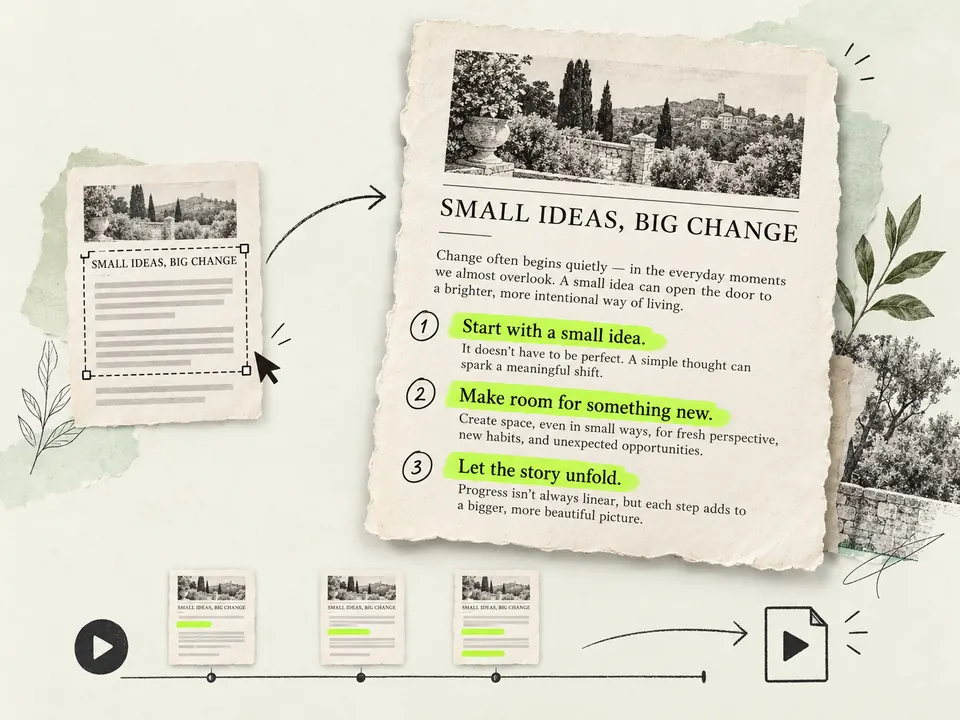
Use an article, research paper, PDF page, or post. Keep its original text and layout.
Drag over the words you want to emphasize, then choose a highlight style.
Play the preview. When it looks right, download the video and use it in CapCut, Premiere, or another editor.
Stop wasting 20 minutes keyframing masks. Get publish-ready kinetic highlights in 5 seconds.
Your screenshots and documents never leave your browser. Powered by offline client-side OCR and WebCodecs.
Fluorescent marker, high-contrast invert, smooth underline, wavy line, crayon texture, and rounded circles.
Keep fonts, columns, headers, and images exactly where they belong. No clumsy text re-typing.
Export standard H.264 MP4 videos ready to drop straight into CapCut, Premiere Pro, Final Cut, or DaVinci Resolve.
Create thumb-stopping visual hooks for TikTok, YouTube Shorts, Reels, and Bilibili.
Highlight breaking headlines, tweets, and statement releases while your voiceover plays.
Draw your audience's eyes to key metrics, conclusion sentences, and chart callouts.
Share golden sentences from Kindle or physical books with satisfying pen stroke sounds.
Walk users through step-by-step guides by sequentially highlighting each instruction line.
Everything you need to know about creating text highlight animation clips.
Yes, it is 100% free with zero watermarks. You don't need to sign up or create an account to export full-resolution MP4 clips.
The video exports as standard MP4 (H.264 at 30fps). You can drag and drop it into CapCut, Adobe Premiere, DaVinci Resolve, or Final Cut Pro just like any B-roll or screenshot asset.
No. The entire process runs locally inside your browser via Canvas 2D and client-side WebAssembly OCR. No image data is ever transmitted to a server.
In After Effects or Premiere, creating a text wipe with track mattes, inversions, and camera moves takes 15 to 30 minutes per clip. Here, you drag a box, pick a style, and get an identical cinema-grade animation in 5 seconds.
You can export in 16:9 (horizontal for YouTube/Bilibili), 9:16 (vertical for TikTok/Reels/Shorts), 1:1 (square for Instagram/feed posts), or preserve the original screenshot's aspect ratio.
You can manually drag a rectangle box directly across any part of the image to highlight it. You can combine automatic text lines and manual boxes seamlessly.
Upload a screenshot now and create your kinetic text highlight video in seconds.